
Close Menu
    Facebook X (Twitter) Instagram
    Tech Chacho
    • News
    • Mobile
    • Gadgets
    • Enterprise
    • Security
    • Reviews
    • Startups
    • How To’s
    • More
      • Fintech
      • Education
      • Cryptocurrency
    Facebook X (Twitter) Instagram
    Tech Chacho
    Home » Here’s How You Can Send Anonymous Messages on WhatsApp
    Here’s How You Can Send Anonymous Messages on WhatsApp
    News

    Here’s How You Can Send Anonymous Messages on WhatsApp

    January 25, 2022Updated:January 29, 2022No Comments2 Mins Read
    Share
    Facebook Twitter LinkedIn Pinterest Email

    WhatsApp has been rolling out a lot of impressive updates lately, from customized sticker makers to developing a Windows app for a personalized experience. These aim to enhance user experience but there’s a new trick that will ultimately grant you what you’ve secretly wished for all along.

    Now, you’ll be able to anonymously message your friends and family via WhatsApp, without having to disclose your number or even requiring a SIM in the first place, for that matter.

    The hack is pretty easy and can be accessed from WhatsApp Tools. Although, we do suggest introducing yourself prior to starting the conversation to avoid any confusion. So, without further ado follow the below-mentioned steps, to easily turn on the feature and prank your friends or family.
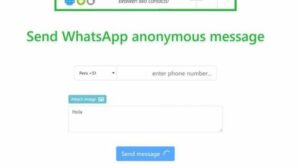
    Here’s How You Can Send Anonymous Messages on WhatsApp

    • Open the WhatsApp Tools page.
    • Tap the “Anonymous Message” option.
    • Choose your country code then write the number you want to message.
    • Next, in the box below the “Attach file” option, simply type your message and add the files, such as photos or videos that you want to attach to the message.
    • Finally, click on “send message” and voila, the message has been sent anonymously.

    This way, using just 5 quick and easy steps, you can send a message anonymously using WhatsApp Tools. Additionally, WhatsApp Tools lets you download the profile picture of any user as long as they have the display picture set to public.

    Share. Facebook Twitter Pinterest LinkedIn Tumblr Email

    Related Posts

    Empowering Pakistani Youth to Unlock Global Opportunities

    February 28, 2024

    Ignite Launches Venture Capital Mechanism Through Pakistan Startup Fund

    February 28, 2024

    Pakistani IT Delegation Shines At Web Summit Qatar 2024

    February 27, 2024
    Ad

    Samsung Galaxy Z Fold 6 Appears in Renders Again With No S-Pen Slot

    February 28, 2024

    ProPakistani Unveils Tecno Innovations at MWC 2024: A Glimpse into the Future of Technology

    February 28, 2024

    University of Management and Technology Hit by a Massive Hacker Attack

    February 28, 2024

    PTCL Group Announces Shoq TV Box Powered by Android TV at Mobile World Congress

    February 28, 2024

    All You Need to Know About Stylish and Feature-Packed vivo Y17s Diamond Orange Edition

    February 28, 2024

    HMD Teases Its First Self Branded Phones Instead of Nokia

    February 28, 2024

    Subscribe to Updates

    Get the latest creative news from FooBar about art, design and business.

    • Facebook
    • Twitter
    • Instagram
    • YouTube
    Mobile

    Samsung Galaxy Z Fold 6 Appears in Renders Again With No S-Pen Slot

    By QuartulainFebruary 28, 20240
    Mobile

    ProPakistani Unveils Tecno Innovations at MWC 2024: A Glimpse into the Future of Technology

    By QuartulainFebruary 28, 20240
    Facebook X (Twitter) Instagram YouTube
    • About
    • Terms Of Use
    • Privacy Policy
    • Disclaimer
    • Affiliate Disclaimer
    © 2026 Designed by Chunk Labs Hosted on Host Chacho.

    Type above and press Enter to search. Press Esc to cancel.

    Go to mobile version