Close Menu
    Facebook X (Twitter) Instagram
    Tech Chacho
    • News
    • Mobile
    • Gadgets
    • Enterprise
    • Security
    • Reviews
    • Startups
    • How To’s
    • More
      • Fintech
      • Education
      • Cryptocurrency
    Facebook X (Twitter) Instagram
    Tech Chacho
    Home » How to Report and Block a Stolen Phone Through PTA
    How to Report and Block a Stolen Phone Through PTA
    Edtech

    How to Report and Block a Stolen Phone Through PTA

    May 10, 2021No Comments2 Mins Read
    Share
    Facebook Twitter LinkedIn Pinterest Email

    Losing or getting your phone stolen is a major problem, especially in bigger cities like Karachi and Lahore. It’s next to impossible to find your phone again so most people want to block it remotely so your precious data doesn’t get into the wrong hands.

    Thankfully, Pakistan Telecommunication Authority (PTA) has launched a new complaint system for reporting and blocking lost/stolen mobile phones online. The new Lost & Stolen Device System (LSDS) makes it easy to lodge a complaint online with all the necessary details so you can report the issue as soon as possible.

    Here is how you can do it for yourself.

    Reporting and Blocking your Device
    If you want to report a stolen or lost phone to PTA, simply follow this link to reach their online complaint system. Here you will provide personal details in a complaint form such as your name, address, email, CNIC, etc. You will also have to provide details of your lost device and reasons for blocking.

    This is what the complaint form looks like.

    (Note that this version of the form will only appear once you select “Stolen Mobile Handset/IMEI Related Complaint?” under “Complaint Details” in the link provided above)
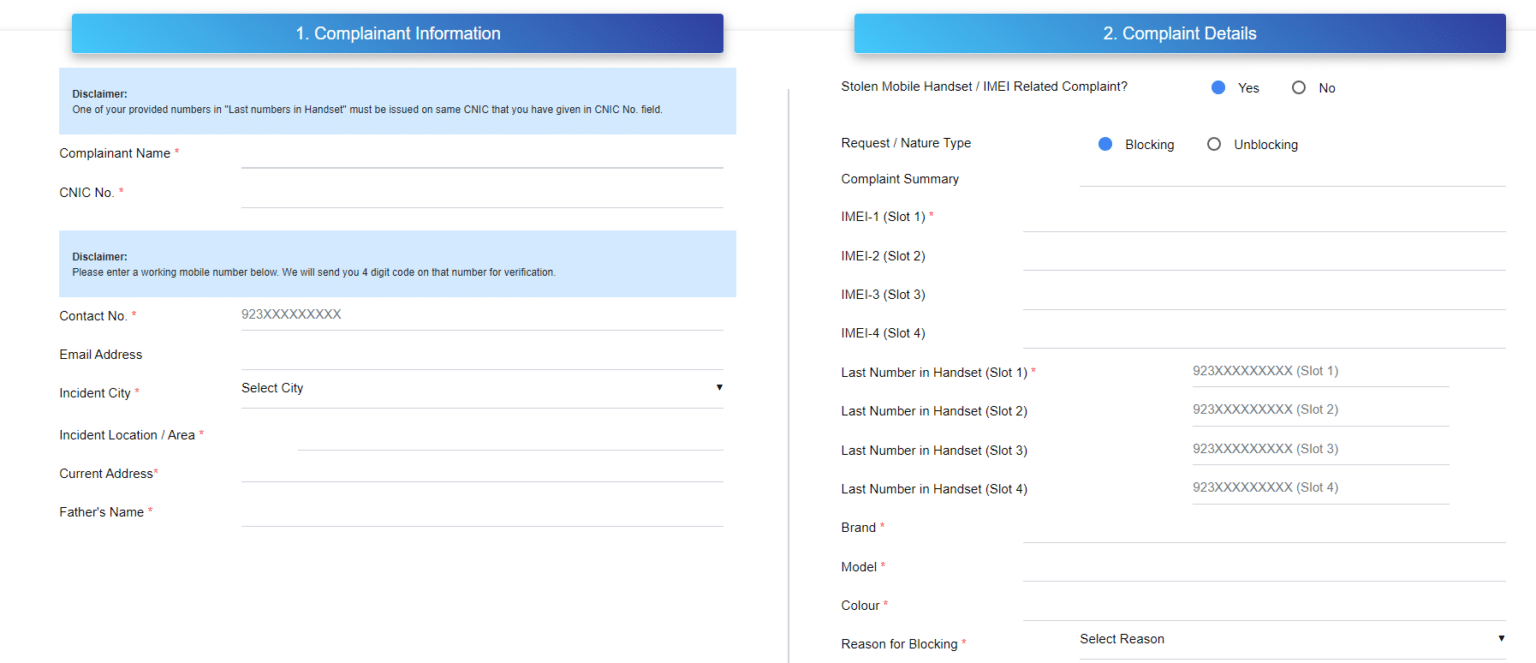
    How to Report and Block a Stolen Phone Through PTA

    Once you have successfully registered a complaint, you will receive a complaint reference number and your phone will be blocked within 24 hours of verification.

    Unblocking Your Device
    If your lost/stolen device has been recovered, you can follow a similar procedure to get your device unblocked through PTA. Simply head back to PTA’s online complaint form and select “Yes” under “Stolen Mobile Handset / IMEI Related Complaint?”. Make sure to select “Unblocking” under “Complaint details” this time, which should give you a much smaller form than before.

    Here is what it looks like.
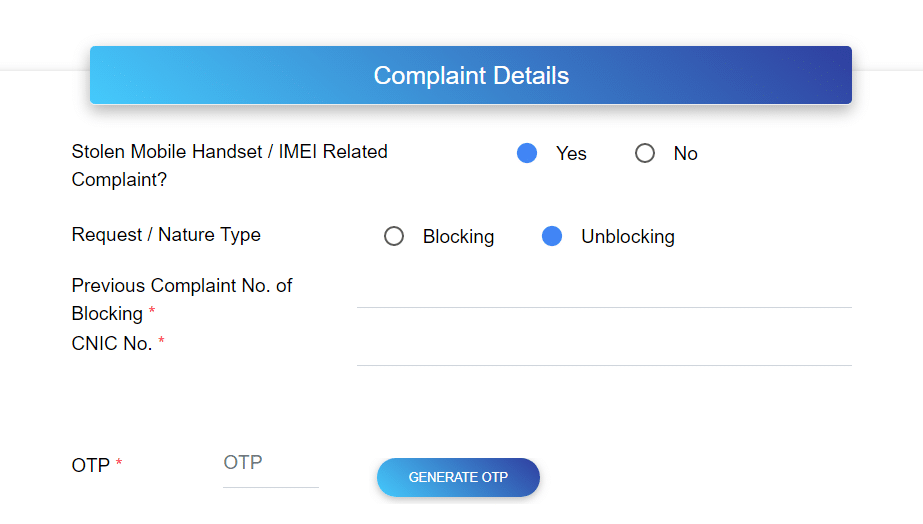
    How to Report and Block a Stolen Phone Through PTA

    Here you will have to provide the complaint reference number you received after filling the first form and other necessary details. You will also have to verify yourself through an OTP (one-time-password) and you will also receive an SMS from PTA once your device is unblocked.

    It is worth mentioning that PTA’s previously available methods (emails and phone calls) of reporting and blocking mobile phones are no longer available. This concludes our detailed guide on how to report and block a stolen/lost phone through PTA.

    Let us know in the comments if you have any questions.

    Share. Facebook Twitter Pinterest LinkedIn Tumblr Email

    Related Posts

    Samsung Galaxy Z Fold 6 Appears in Renders Again With No S-Pen Slot

    February 28, 2024

    ProPakistani Unveils Tecno Innovations at MWC 2024: A Glimpse into the Future of Technology

    February 28, 2024

    All You Need to Know About Stylish and Feature-Packed vivo Y17s Diamond Orange Edition

    February 28, 2024
    Ad

    Samsung Galaxy Z Fold 6 Appears in Renders Again With No S-Pen Slot

    February 28, 2024

    ProPakistani Unveils Tecno Innovations at MWC 2024: A Glimpse into the Future of Technology

    February 28, 2024

    University of Management and Technology Hit by a Massive Hacker Attack

    February 28, 2024

    PTCL Group Announces Shoq TV Box Powered by Android TV at Mobile World Congress

    February 28, 2024

    All You Need to Know About Stylish and Feature-Packed vivo Y17s Diamond Orange Edition

    February 28, 2024

    HMD Teases Its First Self Branded Phones Instead of Nokia

    February 28, 2024

    Subscribe to Updates

    Get the latest creative news from FooBar about art, design and business.

    • Facebook
    • Twitter
    • Instagram
    • YouTube
    Mobile

    Samsung Galaxy Z Fold 6 Appears in Renders Again With No S-Pen Slot

    By QuartulainFebruary 28, 20240
    Mobile

    ProPakistani Unveils Tecno Innovations at MWC 2024: A Glimpse into the Future of Technology

    By QuartulainFebruary 28, 20240
    Facebook X (Twitter) Instagram YouTube
    • About
    • Terms Of Use
    • Privacy Policy
    • Disclaimer
    • Affiliate Disclaimer
    © 2026 Designed by Chunk Labs Hosted on Host Chacho.

    Type above and press Enter to search. Press Esc to cancel.

    Go to mobile version