Close Menu
    Facebook X (Twitter) Instagram
    Tech Chacho
    • News
    • Mobile
    • Gadgets
    • Enterprise
    • Security
    • Reviews
    • Startups
    • How To’s
    • More
      • Fintech
      • Education
      • Cryptocurrency
    Facebook X (Twitter) Instagram
    Tech Chacho
    Home » How to Cancel Your Netflix Subscription
    How to Cancel Your Netflix Subscription
    How To's

    How to Cancel Your Netflix Subscription

    April 27, 2022Updated:April 27, 2022No Comments2 Mins Read
    Share
    Facebook Twitter LinkedIn Pinterest Email

    If you’re looking to save some money, don’t enjoy the price hikes, or no longer enjoy the shows and movies offered by the streaming service, it’s time to cancel your Netflix subscription. Thankfully, it’s easy to do, even if you subscribe through T-Mobile.

    How to Cancel Netflix From the Web

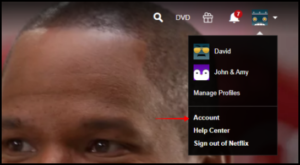
    Once you’ve logged in to your account on Netflix’s website, you’ll want to select the icon in the top-right corner that shows all of the users. When that menu opens, click the “Account” button to get to your account’s membership menu.
    How to Cancel Your Netflix Subscription

    You will now see your account information. Underneath the “Membership & Billing” heading, select the “Cancel Membership” option.

    How to Cancel Your Netflix Subscription

    This will take you to the area where you’ll want to confirm your account cancellation. Select the “Finish Cancellation” button to completely cancel your Netflix membership.

    How to Cancel Your Netflix Subscription

    After that, you’ll only have access to the streaming service until the next billing period comes up.

    How to Cancel Your Netflix Subscription From T-Mobile

    If you have access to Netflix through T-Mobile, you’ll have to go to the carrier’s website to complete the cancellation. Once logged in to your T-Mobile account, you’ll want to select “Manage Add-Ons” under the “I Want To” section.

    How to Cancel Your Netflix Subscription

    When you get to the add-ons page, scroll down to the “Services” section. There will be two Netflix subscriptions that you can access through the service. Unselect the checkmark by the one that you are enrolled in.

    How to Cancel Your Netflix Subscription

    A message will pop up letting you know that you will no longer have access to your Netflix account if you remove it. Click the “Continue Removal” button to remove the payment to Netflix through T-Mobile.

    How to Cancel Your Netflix Subscription

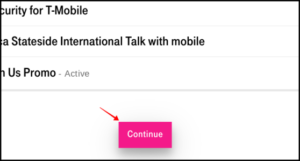
    Once you’re done, scroll to the bottom of the page and select “Continue” to remove Netflix.
    How to Cancel Your Netflix Subscription

    You will no longer be paying for Netflix through T-Mobile. You will retain access to the service for the remainder of your billing period.

    Now that you have successfully cancelled Netflix, you can sit back and relax knowing you won’t have that payment being taken out of your checking account every month.

    VIA howtogreek

    Share. Facebook Twitter Pinterest LinkedIn Tumblr Email

    Related Posts

    How to Insert and Animate 3D Models in Microsoft PowerPoint

    April 27, 2022

    How to Copy Values From the Status Bar in Microsoft Excel

    April 25, 2022

    How to Edit or Delete Contacts in Gmail

    April 22, 2022
    Ad

    Samsung Galaxy Z Fold 6 Appears in Renders Again With No S-Pen Slot

    February 28, 2024

    ProPakistani Unveils Tecno Innovations at MWC 2024: A Glimpse into the Future of Technology

    February 28, 2024

    University of Management and Technology Hit by a Massive Hacker Attack

    February 28, 2024

    PTCL Group Announces Shoq TV Box Powered by Android TV at Mobile World Congress

    February 28, 2024

    All You Need to Know About Stylish and Feature-Packed vivo Y17s Diamond Orange Edition

    February 28, 2024

    HMD Teases Its First Self Branded Phones Instead of Nokia

    February 28, 2024

    Subscribe to Updates

    Get the latest creative news from FooBar about art, design and business.

    • Facebook
    • Twitter
    • Instagram
    • YouTube
    Mobile

    Samsung Galaxy Z Fold 6 Appears in Renders Again With No S-Pen Slot

    By QuartulainFebruary 28, 20240
    Mobile

    ProPakistani Unveils Tecno Innovations at MWC 2024: A Glimpse into the Future of Technology

    By QuartulainFebruary 28, 20240
    Facebook X (Twitter) Instagram YouTube
    • About
    • Terms Of Use
    • Privacy Policy
    • Disclaimer
    • Affiliate Disclaimer
    © 2026 Designed by Chunk Labs Hosted on Host Chacho.

    Type above and press Enter to search. Press Esc to cancel.

    Go to mobile version