Shopping for a new TV and want to get the most for your money? Here’s how to decide how many HDMI ports you need.
Why Consider the Number of HDMI Ports?
When it comes to shopping for a new TV there are a lot flashier things than what kind of ports are on the back. Things like debating if it’s worth shelling out for a beautiful OLED panel over a standard LCD panel, for instance, or if it’s time to finally swap your aging 1080p set for a pixel-packed 4K model are likely factoring in a bit heavier than what kind of ports the TV has.
Even though you rarely touch them after the TV is set up, however, the number (and type!) of ports on the back of your TV have a significant impact on how smooth and convenient your experience with the TV will be.
Too few ports and you’re left plugging and unplugging things or adding an additional layer of hassle into your user experience with an HDMI switch to toggle between inputs. A little consideration now will help you enjoy your TV for years.
How Many HDMI Ports Do You Need?
How many HDMI ports you need depends on the demands of your setup. It’s safe to use a simple “number of devices + one” calculation to figure out the number of HDMI ports you need. This ensures you have room for all your current devices and leaves a spot open to add something in the future.
The type of hardware you have hooked up to your TV can either increase or decrease the number of HDMI ports you need based on the TV based on your setup, though. Let’s take a look at why and how to calculate the number of ports you need based on that.
You Are Using a Home Theater Receiver
A home theater receiver is the modern audio/video equivalent of stereo receivers that have been around for ages. Instead of plugging everything into the TV set, you plug everything into the receiver, and then a single HDMI cable links all of it to the TV.
With a setup like this, it really only matters that you have one available port on your TV because the receiver will handle everything else.
An exception to this situation would be if your receiver is older and doesn’t support a feature a newer piece of equipment in your home setup does.
For example, let’s say your new TV supports HDR10 and your new game console supports HDR10, but your receiver does not.
In that situation, your options are to upgrade your receiver or to plug the game console directly into the TV to bypass the receiver and enjoy the feature.
If you’re serious enough about your home theater setup to have a home theater receiver in the first place, there’s a good chance you’ll be upgrading it to take advantage of all the newest and fanciest features of course, but it’s still something to consider.
You Are Not Using a Home Theater Receiver
For folks who aren’t using a home theater receiver, the number of HDMI ports on the TV suddenly becomes way more important because the TV set itself will be doing all the switching and signal management.
In that case, it’s time to take stock of your setup and needs. Start by counting up the number of devices you will be using with the TV as well as considering whether you’re willing to unplug things if need be or manually switch between them with an HDMI switch.
If you want your Apple TV, your Blu-ray player, your Xbox, and your Switch dock all plugged in simultaneously, you’ll need a minimum of 4 HDMI ports just to support the gear you have.
On the other hand, if you use the TV’s built-in smart features for your streaming needs and otherwise only use the TV to game on a single console, you’d only need one HDMI port.
As a general rule, however, it’s not wise to rely entirely on the built-in functionality of your smart TV and keeping a port free to pop in a stand-alone streaming device like an Apple TV, Roku, or Chromecast is always a good idea.
Pay Attention to the Type of HDMI Ports
For the vast majority of people, the type of HDMI ports found on a new purchase of anything but the smallest budget TV set will cover pretty much everything they need. But you’ve dug this far into the “How many HDMI ports do I need?” question, so why not round it out with “What kind do I need?”
The days of only the fanciest of TVs having the best HDMI tech are largely behind us. HDMI 2.0 supports up to 4K/60hz, for instance, and has been out since 2013. HDMI 2.1, which supports 4K and 8K, both up to 120hz, is becoming increasingly common.
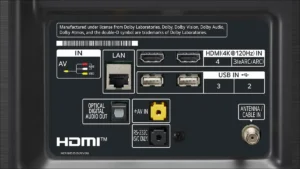
Still, it pays to look at what ports a TV has in order to ensure it meets your needs. Here are a few designations you’ll need in TV listings and printed on the ports themselves.
- HDMI 2.0 / HDMI (4K @ 60hz): Indicates the port supports HDMI 2.0.
- HDMI 2.1 / HDMI (4K @ 120hz): Indicates the port supports HDMI 2.1. Look for this if you have a newer game console like Xbox Series X to take advantage of 120Hz refresh rates.
- HDMI (ARC) or HDMI (eARC): Indicates the port supports Audio Return Channel (ARC) or the improved version Enhanced Audio Return Channel (eARC).
For most setups, things like ARC aren’t critical—unless you want to link your TV to a nice soundbar for room-filling sound. And, generally speaking, you can simply look for higher numbers in everything else as you want the newer HDMI standards with more bandwidth and features. Even if your current gear doesn’t take full advantage of it, devices you purchase in the coming years probably will.
VIA howtogeek