
Close Menu
    Facebook X (Twitter) Instagram
    Tech Chacho
    • News
    • Mobile
    • Gadgets
    • Enterprise
    • Security
    • Reviews
    • Startups
    • How To’s
    • More
      • Fintech
      • Education
      • Cryptocurrency
    Facebook X (Twitter) Instagram
    Tech Chacho
    Home » How to Protect Your WhatsApp Account Against Scams
    How to Protect Your WhatsApp Account Against Scams
    Skull of death symbol on the screen of smartphone on laptop computer. There is data flowing background. Selective focus on screen of the phone.
    Applications

    How to Protect Your WhatsApp Account Against Scams

    January 25, 2022Updated:January 29, 2022No Comments2 Mins Read
    Share
    Facebook Twitter LinkedIn Pinterest Email


    WhatsApp scams are on the rise once again. A new SIM swapping method lets attackers steal your phone number and assign it to a new SIM card, giving them complete access to your WhatsApp account. This method is not very easy, but it is always better to be safe than sorry.

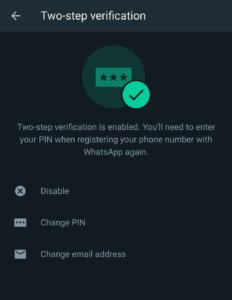
    Two-factor authentication (2FA) is an important security measure that adds another layer of protection to your WhatsApp account. But in such cases, 2FA may not be enough as hackers could easily bypass 2FA security if they have access to your phone number.
    How to Protect Your WhatsApp Account Against Scams

    This is because WhatsApp gives you an option to recover your 6 digit 2FA PIN through your phone number in case you don’t remember it anymore. But if scammers have access to your phone number, they can easily reset your 2FA PIN by using your phone number as a recovery method.

    This is why you should never use your phone number in your emails as a recovery method for 2FA, especially with the rise of SIM swap scams. Instead, you should use authenticator apps like Google Authenticator, Authy, and 1Password. These apps let you receive authentication codes to a secure app rather than your text messages.

    This way, your authentication codes will be out of reach for anyone with your phone number.

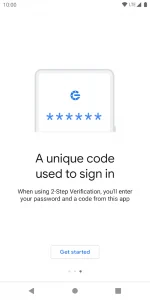
    Using these authenticator apps is quite easy. The Google Authenticator, for instance, can easily be downloaded from the Google Play Store and it helps you set up verification codes outside of your text messages.
    How to Protect Your WhatsApp Account Against Scams

    Simply download the app to get started and it will guide you through some simple and straightforward steps to set up a 2FA authentication code. These secure codes will not only work for WhatsApp, but for a variety of other apps and services.

    Share. Facebook Twitter Pinterest LinkedIn Tumblr Email

    Related Posts

    Over 300 Tablets Used in Elections and Census Stolen From DEO’s Office

    February 28, 2024

    Armed Men Steal Mobile Phones Worth Millions From Courier Company

    February 12, 2024

    PSL 2024 Unleashes Watch & Earn Magic on myco – Tune in for Rewards Now!

    February 4, 2024
    Ad

    Samsung Galaxy Z Fold 6 Appears in Renders Again With No S-Pen Slot

    February 28, 2024

    ProPakistani Unveils Tecno Innovations at MWC 2024: A Glimpse into the Future of Technology

    February 28, 2024

    University of Management and Technology Hit by a Massive Hacker Attack

    February 28, 2024

    PTCL Group Announces Shoq TV Box Powered by Android TV at Mobile World Congress

    February 28, 2024

    All You Need to Know About Stylish and Feature-Packed vivo Y17s Diamond Orange Edition

    February 28, 2024

    HMD Teases Its First Self Branded Phones Instead of Nokia

    February 28, 2024

    Subscribe to Updates

    Get the latest creative news from FooBar about art, design and business.

    • Facebook
    • Twitter
    • Instagram
    • YouTube
    Mobile

    Samsung Galaxy Z Fold 6 Appears in Renders Again With No S-Pen Slot

    By QuartulainFebruary 28, 20240
    Mobile

    ProPakistani Unveils Tecno Innovations at MWC 2024: A Glimpse into the Future of Technology

    By QuartulainFebruary 28, 20240
    Facebook X (Twitter) Instagram YouTube
    • About
    • Terms Of Use
    • Privacy Policy
    • Disclaimer
    • Affiliate Disclaimer
    © 2026 Designed by Chunk Labs Hosted on Host Chacho.

    Type above and press Enter to search. Press Esc to cancel.

    Go to mobile version