Close Menu
    Facebook X (Twitter) Instagram
    Tech Chacho
    • News
    • Mobile
    • Gadgets
    • Enterprise
    • Security
    • Reviews
    • Startups
    • How To’s
    • More
      • Fintech
      • Education
      • Cryptocurrency
    Facebook X (Twitter) Instagram
    Tech Chacho
    Home » Valve’s Steam Deck Can Limit FPS to Save Battery Life
    Valve’s Steam Deck Can Limit FPS to Save Battery Life
    Gadgets

    Valve’s Steam Deck Can Limit FPS to Save Battery Life

    July 26, 2021No Comments2 Mins Read
    Share
    Facebook Twitter LinkedIn Pinterest Email

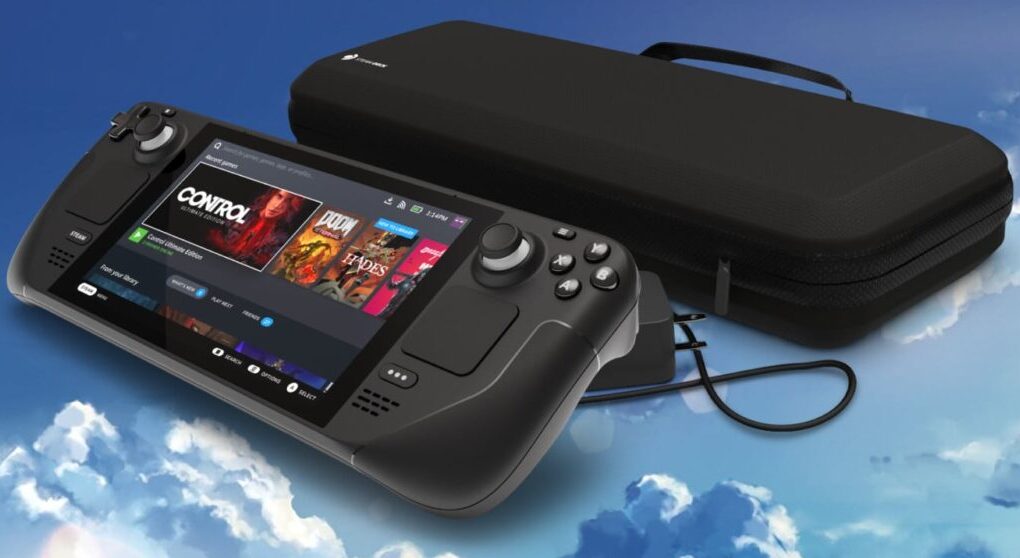
    The Steam Deck was announced last week as a handheld gaming PC that can run all your Steam games on the go. When Valve announced that it would target “30Hz gameplay”, many were disappointed, but Valve’s Pierre-Loup Griffais has now clarified that comment and has revealed a new feature for the console.

    He has clarified that the 30 FPS is more of a minimum bar than anything else and most games have actually exceeded that limit easily. The “30 FPS target” was only referred to as playable in Valve’s performance testing.

    Of course, this does not mean that all modern games will run at 60 FPS, so keep your expectations low.

    The "30 FPS target" refers to the floor of what we consider playable in our performance testing; games we've tested and shown have consistently met and exceeded that bar so far. There will also be an optional built-in FPS limiter to fine-tune perf vs. battery life.

    — Pierre-Loup Griffais (@Plagman2) July 25, 2021

    He adds that there will be an optional FPS limiter for when you want to save battery life. A 30 FPS mode will be something you can turn on anytime, but it is unclear whether it will be available for all games. Valve has already said that you can play Portal 2 for up to 6 hours with the FPS limiter, instead of the normal 4 hours.

    However, as Digital Foundry says, a 30 FPS mode will be fine for demanding games, but it may cause stuttering and other problems once V Sync is active.

    A 30fps setting will be fine for demanding games, but with v-sync active please ensure that a new frame is synchronised with every other screen refresh (typical on consoles) to ensure consistency. 30fps capped but delivered unevenly at 16.7ms/33.3ms/50ms is not a great experience

    — Digital Foundry (@digitalfoundry) July 25, 2021

    Valve is yet to comment on this statement, but we will keep you up to date as soon as there is a development.

    Share. Facebook Twitter Pinterest LinkedIn Tumblr Email

    Related Posts

    ProPakistani Lights Up Mobile World Congress 2024 with Exclusive Xiaomi Unveilings

    February 27, 2024

    Oppo Unveils Its Latest AR Glasses With AI Features

    February 27, 2024

    Samsung Finally Unveils Its First Smart Wearable Ring at MWC

    February 27, 2024
    Ad

    Samsung Galaxy Z Fold 6 Appears in Renders Again With No S-Pen Slot

    February 28, 2024

    ProPakistani Unveils Tecno Innovations at MWC 2024: A Glimpse into the Future of Technology

    February 28, 2024

    University of Management and Technology Hit by a Massive Hacker Attack

    February 28, 2024

    PTCL Group Announces Shoq TV Box Powered by Android TV at Mobile World Congress

    February 28, 2024

    All You Need to Know About Stylish and Feature-Packed vivo Y17s Diamond Orange Edition

    February 28, 2024

    HMD Teases Its First Self Branded Phones Instead of Nokia

    February 28, 2024

    Subscribe to Updates

    Get the latest creative news from FooBar about art, design and business.

    • Facebook
    • Twitter
    • Instagram
    • YouTube
    Mobile

    Samsung Galaxy Z Fold 6 Appears in Renders Again With No S-Pen Slot

    By QuartulainFebruary 28, 20240
    Mobile

    ProPakistani Unveils Tecno Innovations at MWC 2024: A Glimpse into the Future of Technology

    By QuartulainFebruary 28, 20240
    Facebook X (Twitter) Instagram YouTube
    • About
    • Terms Of Use
    • Privacy Policy
    • Disclaimer
    • Affiliate Disclaimer
    © 2026 Designed by Chunk Labs Hosted on Host Chacho.

    Type above and press Enter to search. Press Esc to cancel.

    Go to mobile version